
What you will need
- Know the serial number of the problematic device.
- The iPad is correctly assigned in:
- JAMF (specifically the account ID and venue name)
- HubSpot
TROUBLESHOOTING
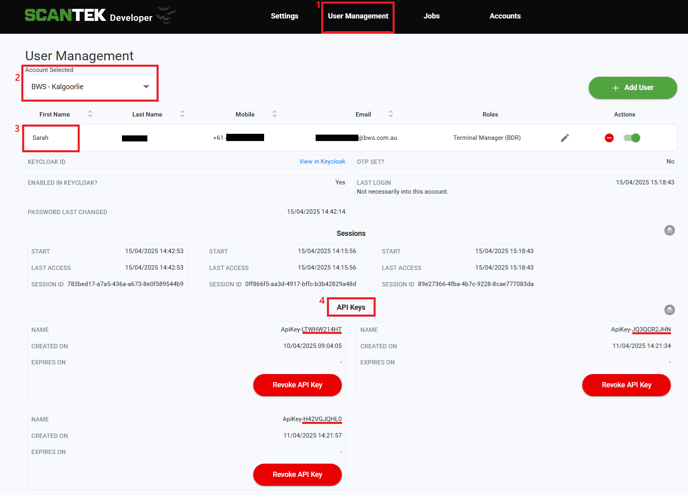
- Go to the BDR Admin Portal (https://portal.bdr.scantek.cloud/)
- Login with your credentials
- Select User Management (1) from the menu
- Search and select the affected venue (2).
- Click on the first name (3) (Note: each BDR venue should only have one active user)
- Go to section labelled "API Keys" (4)
- Is the reported iPad's serial number listed?
- Yes - the BDR iPad has offline scanning configured.
- Does the created date line up with your expectations?This should align with when the iPad was initially configured for the venue.
- No - raise with the developers in the #bdr-channel(slack)
- Yes - the BDR iPad has offline scanning configured.
NOTE
The iPad's setup process, which is enforced upon login, requires offline scanning to be configured before it can be used at a venue.