
TIP
Confirm that the status of each asset accurately reflects its real-world location and condition. For example, verify that any iPad marked as ‘In Transit’ is genuinely in transit.
Export the Report
A reminder will be sent in the #bdr-channel in slack. Alternatively, go to BDR Monthly Asset Report.

- Click the link.
- At the top right of the report, click the Actions dropdown menu, then select Export.
- In the dialog box, click Export.
- Once the export is processed, HubSpot will send a download link to your email.
- Click Download
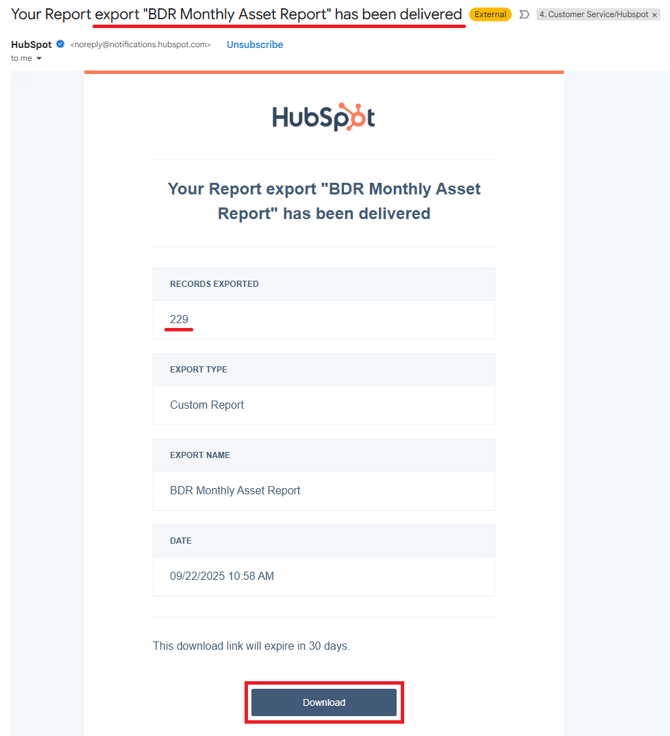
- Open the .zip folder and extract the data.
Prepare the Data
- Open the file labelled "hubspot-export-summary"
- Highlight the headings
- Select the heading cells
- In the Home tab, under Styles, select Heading 4

- From the Status column, remove "Asset State"
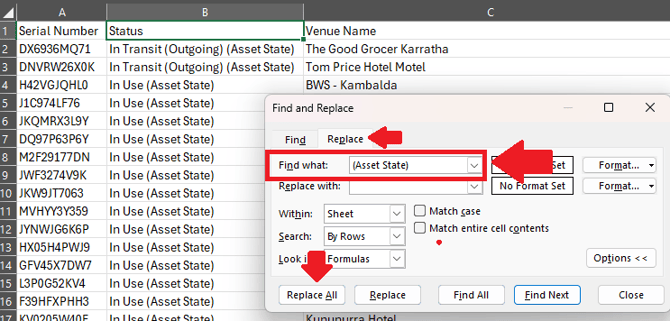
- Press Ctrl + F
- Click 'Replace' tab
- Enter "(Asset State)" in the field labelled Find what:
- Click Replace All
- Save the file.
- Rename the file to "BDR Asset Report"
You can also use this Device Report Template which contains a 'KEY' and auto summarises the data.
Email the Report to the Client
- Go to your Conversations inbox and select the BDR inbox.
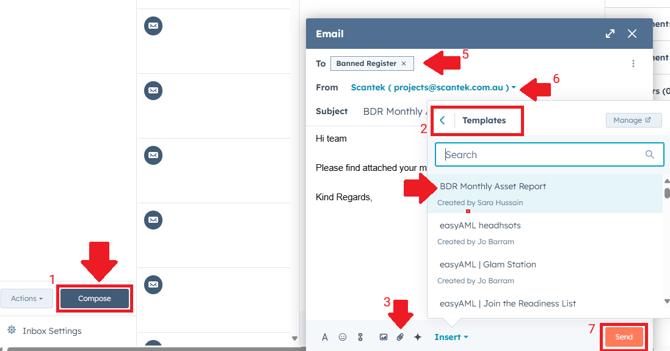
- Click Compose (1) to create a new email.
- Click Templates (2) and select "BDR Monthly Asset Report" from the list.
- Attach the recently exported and prepared asset report file.
- Click the paperclip icon (3)
- Select Upload File
- Enter the appropriate recipient email address(es).
- To: bdr@lgirs.wa.gov.au (5)
- From: projects@scantek.com.au (support email is also fine, but Cc the Projects team)
- Double-check for accuracy, completeness, and professionalism.
- Click Send (7).
Store the Device Report
It's always handy to have a local copy stored for reference when required.
-
In G Drive, go to Shared drives > Select 6 - Projects (OneDrive) > 01 LGIRS (WA Gov) - BDR > 12 Reporting > BDR SLA Reporting > Hubspot - Monthly > Device Reports - Monthly
If you don't have access, drop it in this folder.