
The purpose of the Banned Drinkers Register (BDR) program is to help reduce alcohol-related harm in the community.
Content
- What should the Operator see?
- Does the BDR ban exist?
- Why did the Operator not get notified of the active ban?
- Troubleshooting
Expected Banned Result
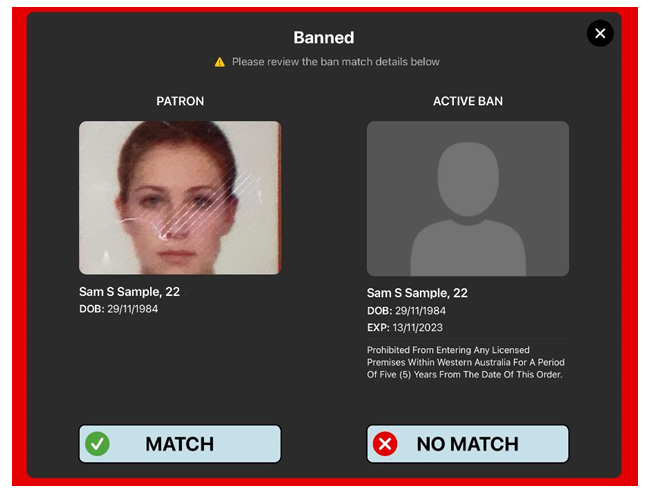
Where the name and DOB are captured correctly, and the ban check returns a result, the Operator should see the below screen.
TIP
Where there is more than one ban match, the ‘No Match’ button will remain disabled until all possible matches have been reviewed.
üïµÔ∏èFirstly, is the reported patron on the BDR ban list? Check the Portal for the ban.
-
Log in to the BDR Portal.
-
Click the 'Bans' tab, and Filter for:
- Active and Deleted bans; and
- Official Bans
- Clear the 'Ban Ends' date
- Is the patron listed?
- No - Has the caller (e.g., police) provided evidence that the Patron is on the banned drinkers register (BDR)?
- No - advise the caller an active BDR ban could not be located for that patron. Nothing further.
- Yes - If the ban creation date is known, request the @BDRdevteam to check the ban import file from that time. If the ban cannot be located, notify the Client (LGIRS) of the query and a summary of your troubleshooting efforts - close if nothing further.
- Yes - is the ban active?
- No - Advise the caller the ban is no longer active. Nothing further.
- Yes - See below.
- No - Has the caller (e.g., police) provided evidence that the Patron is on the banned drinkers register (BDR)?
ü§îThe patron is on the ban list ... so why didn't the App display 'Banned'?
This could be due to a few reasons, including:
- The ID was misread, and the Operator didnot manually correct the information; or
- BDR bans have not synced to the iPad;
- The Ban has expired;
- The ban is missing information. E.g., incorrect DOB, or a name is misspelt.
NOTE
For a scanned ID that partially matches a BDR ban ('Possible Ban'), the BDR App will return the final result as 'Banned' if the first name, last name, and Date of Birth are an exact match. (Reference: CORBDR018)
Why? Patrons have more than one ID which may or may not display their middle name.
Troubleshooting
-
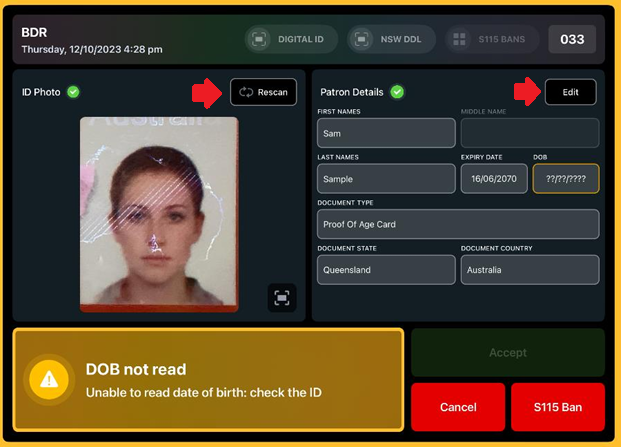
Check that the captured ID information is correct. Especially the full name and DOB.
-
If not, use the 'Edit' button to fix any misreads or press the 'Rescan' button to try scanning the ID again.
-
- Check that the ban is active
- Go to the BDR Portal.
- Bans tab > search for the ban
- Check the ban end date.
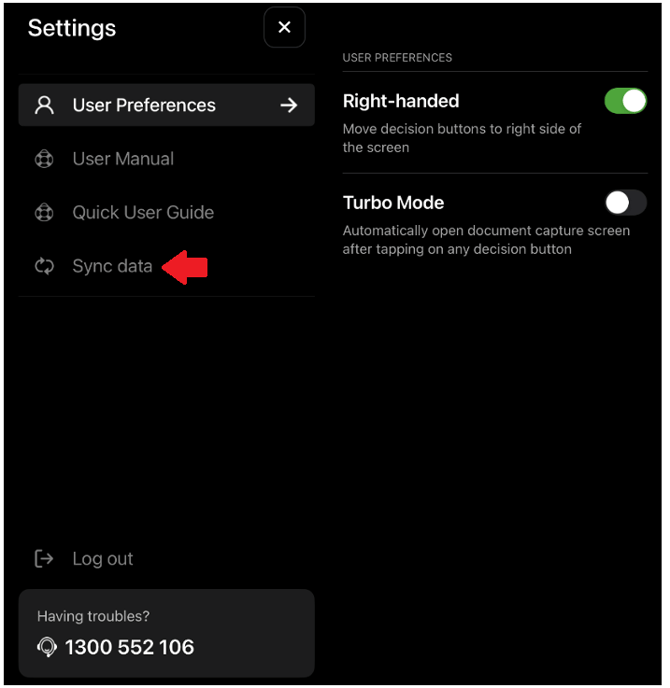
- Sync the ban list on the iPad - Instruct the Licensee to perform a manual sync:
- Within the BDR App, tap Settings cog⚙️
- Tap the 'Sync data' button
NOTE
S115 Bans are only applicable to the Licensee (venue) which created the ban. Only banned drinkers register (BDR) bans are shared.
IMPORTANT
Selling alcohol to a person on the BDR is prohibited and may incur a fine for the Licensee (venue).
If the result is 'Banned', the Licensee must refuse service to the customer.