
Issue: An iPad is missing from the BDR Portal.
Answer: One of the below -
- Check that the SID is correctly linked in HubSpot; or
- Ensure the iPad is correctly associated to the venue; or
- Check that the Asset type is 'Tablet'
Note
The BDR Portal filters rely on the data provided in HubSpot.
Acronym
- SID - Scantek Identifier
Where do I find the SID property in HubSpot?
- In HubSpot, go to Companies
- Locate and click on the venue, e.g., Grand Hotel Kookynie
- Check if the SID field has a value:
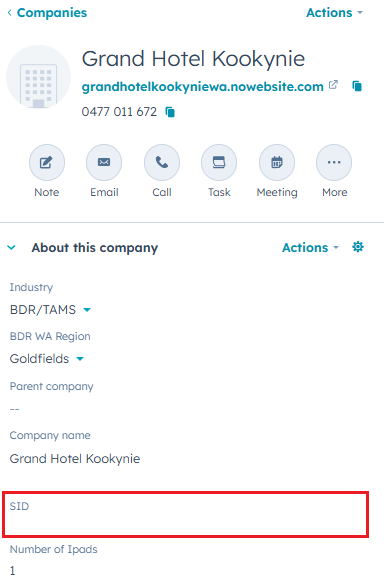
- In empty, enter the SID.
Note: If you don't see the SID field, you may need to edit your view. Speak to your supervisor or team lead for assistance.
How to find the SID?
A list of SIDs for the BDR venues can be found in the IMS - here.
To manually locate the SID:
- Go to https://portal.bdr.scantek.cloud/
- Enter your credentials
- Select Account: Scantek
- Select Role: Customer Support
- Enter the MFA code
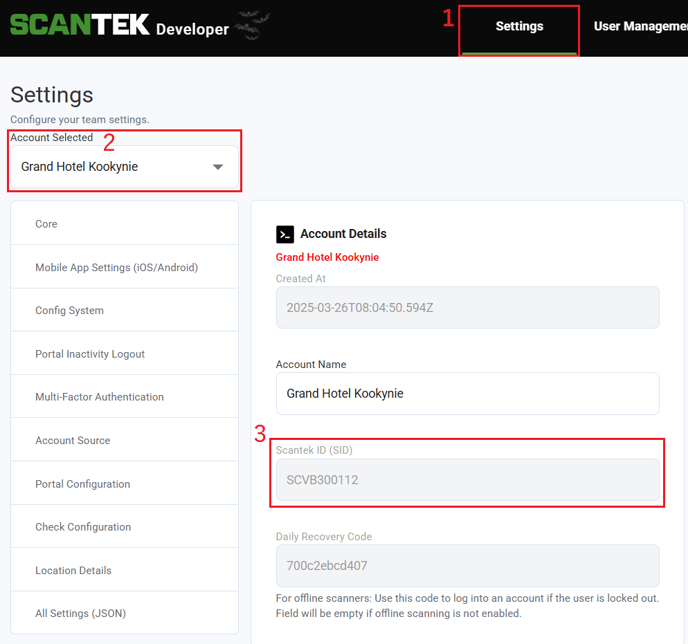
- Go to Settings (1)
- Search for the venue account (2)
- Note the SID (3)
IMPORTANT
There are a handful of venues that are no longer part of the BDR program, so the SID has been removed from HubSpot. However, the Company will remain in HubSpot for history.
Before adding the SID in, check for a pinned note in the Company which will state the reason for the missing SID.