
ATTENTION
Direct all Licensee change requests to the BDR team (Client). Do not proceed with a change until advised by the Client.
- In HubSpot, update the Company name and link the Client email to the Company.
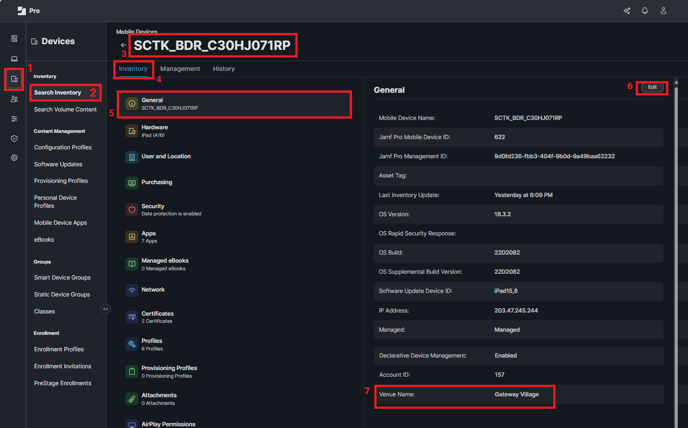
- In JAMF, update the Account Name for each of the allocated devices.
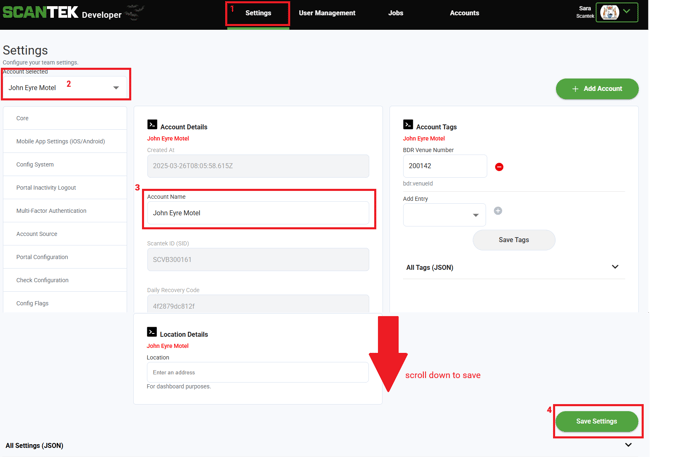
- In the Developer Portal, update the Account Name.
-
- Go to the Admin Portal and login as a Tenancy Admin
- Select Settings from the navigation bar
- Search for the venue you need to update
- Enter the new venue name
- Scroll down and click 'Save Settings'
IMPORTANT
Notify the Client once our records have been updated to reflect the venue name change.