
| Error Code | Error Message | Notes |
| SCTK.1.0.0 | Setup error when attempting to login offline. App and device auto logged/locked out. | BDR specific. Experienced during the April 2025 rollout. |
| SCTK.1.2.12 | Log out and back in to resolve. | |
| SCTK.1.2.12 (12) |
|
|
| SCTK.1.2.14 |
|
|
| SCTK.1.2.24 | 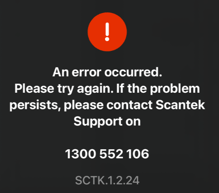 |
BDR iPads only. Occurs when pressing the disabled 'NSW DDL' button. See article: BDR: Can't scan NSW DDL |
| SCTK.1.9.3 |
"Document failed security checks SCTK.1.9.3" |
To resolve: Refresh the licence on the patron's device and try again. Note: if this happens when scanning a QLD DDL, it's possible that the App is sending details from Marine licence which is an unapproved ID type. |
| SCTK.1.9.5 | "Document transfer expired. Please try again. SCTK.1.9.5" |
|
|
|
||
|
|
||
| SCTK.5.0 |
"Unexpected error" error SCTK.5.0 / Invalid username or password. |
Opens the app, it shows a message " Initializing" then it clears out after 3 seconds |
If the code isn't listed here or a solution is not available, please escalate to the development team in the appropriate channel.