
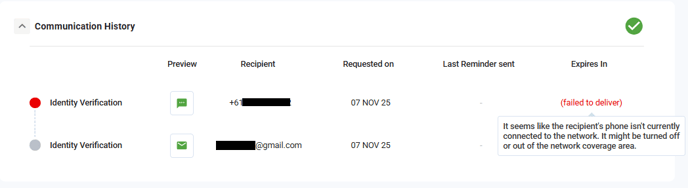
Option ONE - Guide the caller (Client)
- Login to the Portal
- Locate the transaction (use the search option or locate it in the list)
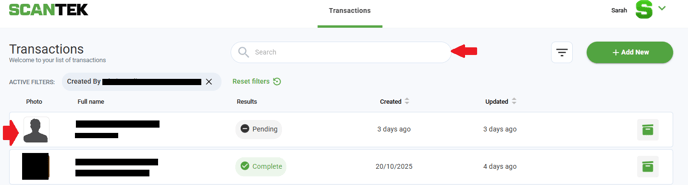
- Click "Change Subject Details"

- Correct or add the Mobile Number/Email
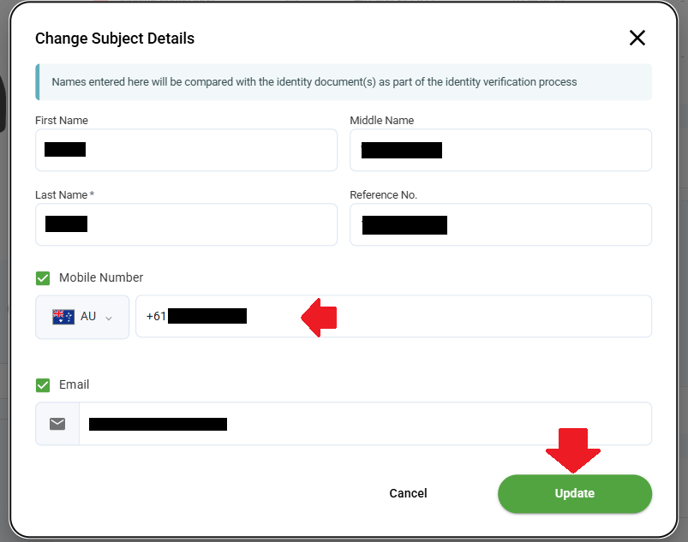
- Click "Update". This will resend the end-user the SMS with the VOI link.
TIP
If the mobile number/email is correct, enter an alternative phone number to receive the VOI.
Option TWO - Re-send on behalf of the Client (try to avoid, if you can)
TIP
Obtain written permission from the caller prior to doing this.
- Login as an assumer (Refer to Platform accounts for Customer Service Team)
- Select the Account (Company), Role and User (Caller)
- Locate the transaction.
- Click "Change Subject Details"
- Correct or add the 'Mobile Number' / 'Email'
- Click "Update". This will resend the end-user the SMS with the VOI link.'
Require further assistance? Post your query in the Slack #customerservice channel, and tag the @platformteam.