
NOTE
Only S115 Bans can be modified by the Licensees.
Unable to create or remove a S115 ban
Step 1: Check Permissions
- Access Admin Portal as a Tenancy Admin
- User settings ‚Üí Find account
- Check user has “Terminal Manager (BDR)” role
IMPORTANT
If the user account has a different role, correct it to 'Terminal Manager (BDR)'
Unable to remove a S115 ban
NOTE
S115 Bans are only applicable to the Licensee (venue) which created the ban.
Step 2: Check for existing ban
The customer may already have an existing S115 ban from that venue. To check:
- Portal: Search the S115 bans list
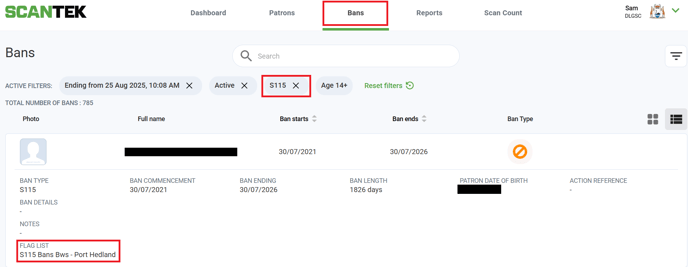
- Bans tab > Filter for S115 Bans
- Locate the ban(s) for the patron and open it.
- The 'Flag List' will specify which venue the ban belongs to
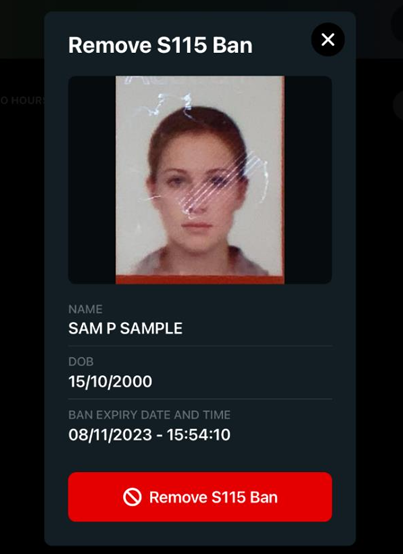
- iPad: The Licensee can search for the ban in the App
- Select 'S115 Ban' button > select 'S115Ban List'
- Scroll through the bans or use the search option to look for the ban.
- Confirm that the ban details match the document. If so, select 'Remove S115 Ban' to delete the ban.
TIP
BDR User Manuals are accessible within the BDR App. Licensees can refer to the documents on how to create or remove the bans.