
NOTE: DVS 999 failures need to be re-run, either manually by CS team/VOI team or in batch/bulk by dev team .
Step 1:
If we receive a DVS 999 failure email, please ensure a ticket has auto-populated for it, if not, please create one, it will look like this:
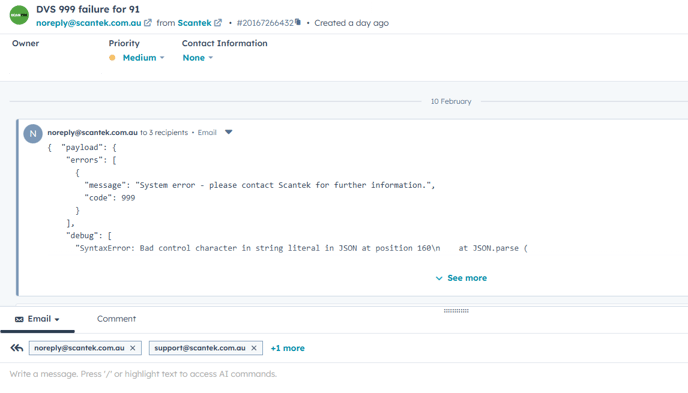
To lookup the owner of the transaction, take the oac from the subject line (3 letters and a number) and search in the DVS ACCESS REGISTER
Step 1: Confirm reason for the failure:
Search for
Client received SOAP Fault from server: User is not authorised for the given request type.
in the body of the email. If this is shown then either the OAC code has been entered incorrectly or the OAC code has been deactivated by the IVS manager. Confirm the code in the DVS access register, correct using portal admin account if incorrect or email IVS manager if the code has been deactivated. Note if this error is shown the bulk re run script will not work.
If any other error message continue below.
Option 1: Single or less than 5 transactions
Refer to the DVS access register to find the email to use for assuming.
Option 1 - step 2
Please check for any client comms for the transaction or duplicate 999 tickets
If there are duplicate tickets + client comms, please merge the tickets.
- Update the company in the ticket
- Continue to Option 1 - Step 3
Option 1 Step 3: Ticket hygiene - Ticket
4a. Update the ticket title to
4b. Pipeline: VOI
4c. Under platform/VOI -> Platform issue: DVS 999 error
4e. Log into the client portal
If you dont have portal access or an assumer, please call this out to the CS team so someone can assist
4f. Confirm who submitted the transaction - add that contact to the ticket and remove scantek or if someone emailed us about the transaction, set them as the contact.
4g. Check transaction state:
4g-i. Force matched: Note the date of the forced match in the notes
4g-ii. Email the contact with the csv attached using snippet #dvs outage re run
- see example image 1. 2
4g-iii update your notes and then close the ticket - see example image 1. 1
4h. Pending action: Follow the process for manual Re-runs (upload the result into the portal)
4h-i. Email the contact with snippet # have rerun DVS
4h-ii. Update your notes and then close the ticket.
Option 2: Multiple DVS 999 emails:
Multiple emails from DVS, but no CS tags and nothing is mentioned in slack, please post this into the #customerservice or #conveyancer channel and tag the dev team and CSteam e.g:

Option 2 - step 2:
The dev team will do bulk or batch re-runs and provide a zip folder.
The zip will look something like this:

- Extract all the files (it will be excel CSV format) will look something like this:
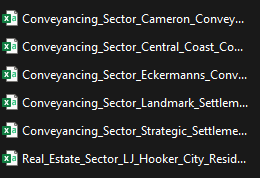
it will always start with the industry/pipeline, followed by the company it belongs to.
Note: sometimes there can be re-runs in here that have no 999 emails or client comms
Option 2 - step 3:
Please check with the conveyancing team if they are with sending CSV files, this is because more often than not, they do tend to send these themselves.
In the event the conveyancing team are not sending these, please find the main contact for each of the companies listed in the zip folder and send them the corresponding CSV file with the template #dvs outage re run
Example images and tips for success:
1.1:
1.2:
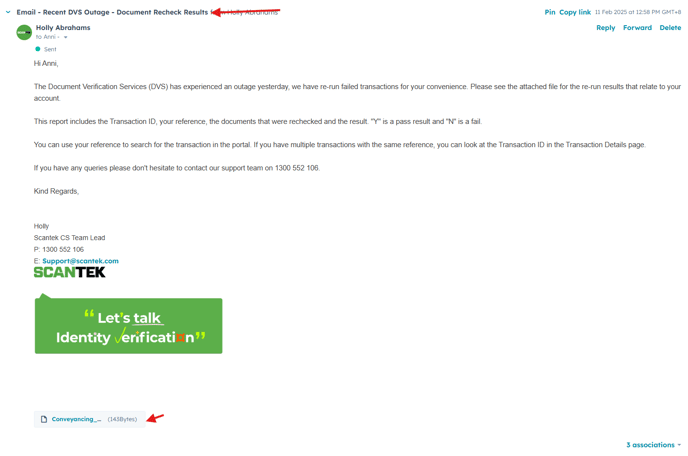
- There is a snippet for this: #DVS outage re run ( im not posting it here as its subject to change)
- There is a subject at the top of the snippet
- Update the subject, attach the appropriate CSV to the email, it should look like this:
NB: if you find that there is a "D" fail in the CSV e.g "subject to breach" very specific example: WA Dot block
- Please include that in the email: before the if you have any queries part
e.g. Transaction X has a "D" result due to
This means its possible the client has a block on their licence, could you please query if that is the case? In order for us to check the licence, this will need to be removed, it can be put back once the re-run is complete, please see the below link on how to do this
- Once you've emailed the client, close the ticket
- Should they reply, we can assist further.
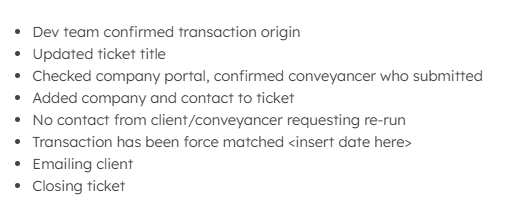
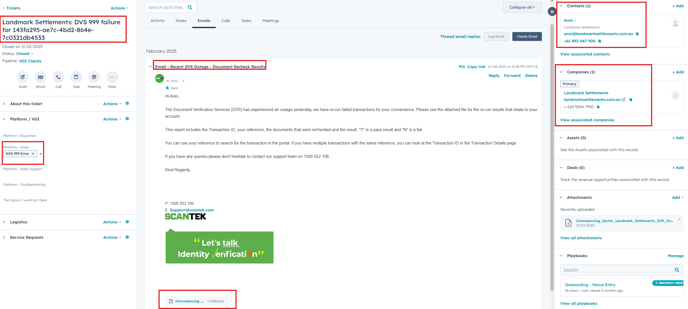
1.3 Gold standard ticket hygiene looks like this:
If you have any questions, please hesitate to ask. Just kidding. ask.
ALWAYS ASK IF YOU DONT KNOW!