
Non OLGR venue
OTP - For Support team
1. Direct customer to ask another manager to login to the portal at portal.ve.scantek.cloud
2. Click on the icon on the top right then click user management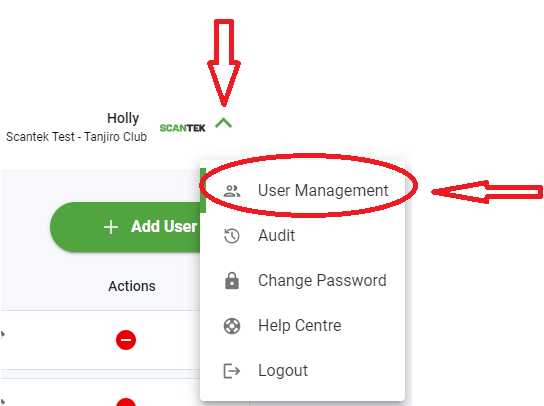
3. Click on the user who needs the OTP reset
4. If OTP is configured for that account there will be a button which says "reset OTP", click this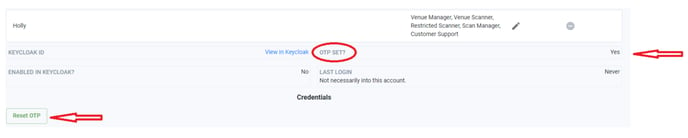
5. The user can now login and will be prompted to setup OTP again.
OTP - For admins
1. Login to your admin account with Tennancy Admin or Admin role
2. Click User management and search for the venue
3. Click on the affected user, if the user has OTP configured then under the Credentials header is a button Reset OTP
4. The user can now login and will be prompted to setup OTP again.
Password
1. Use the password reset function on the login screen
Old Method - Still works but not preferred