
[top]
Police
End User
-
Process
-
Establishing what product was used
-
Request for Data to be deleted
-
Conveyancing
-
Woolworths
-
Bookkeeping
-
SME (Betfair, Kennards Hire)
-
Venue Entry
-
Venue Entry OLGR

Police
Venue Entry
Scantek cannot directly provide venue data to the police. The police must obtain the file from the venue and then contact Scantek with a code to unlock the file.
For more information on how to unlock this file see: Unlocking Reports and Sending Password for Witness List for Venue Entry
Example:
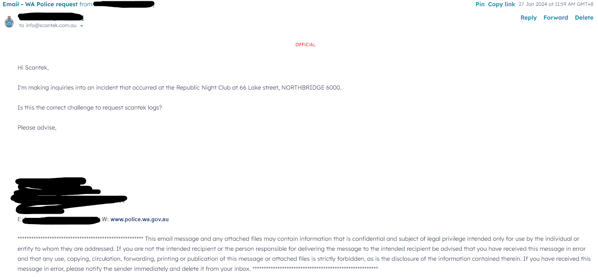
Snippet: Police wanting information
Unfortunately, Scantek cannot directly access a venue's scanned data. Whilst we provide the equipment and software for the venues, the data generated belongs to those venues (other than the bans shared). Our legal advice has been that any access to a client's data without their express permission would be trespass.
If the data you want is from the last 28 days, the venues have a tool called Export Witness List that allows them to export scans for an evening; they should be able to access and provide that to you directly.
Generally, after 28 days, the information is securely wiped and not accessible anymore. However, data about bans placed on patrons is stored forever and can be accessed or reviewed even after a ban has expired or been deleted.
If you have a specific person you are searching for, we can check our ban system to see if they are on it, or we can provide you with a list of Venues you may want to contact about witness lists.
Do NOT copy and paste this text - please use the snippet for the most up-to-date response.
BDR
Scantek cannot provide this information directly to the police.
Instead, the Department of Local Government, Sport and Cultural Industries (DLGSC) can request it from Scantek and then pass it on to the police.
If you need this information, please submit a request in the BDR channel on Slack, and a member of the BDR developer team will assist you.
Snippet: BDR Data Request (Police Request via the Licensee)
Any requests for access to the data on the BDR scanners can be made directly to the Department of Local Government, Sport and Cultural Industries at bdr@dlgsc.wa.gov.au.Please note, all personal data collected from the scans are securely managed and deleted after 24 hours.Please contact Customer Service on 1300 552 106 and choose option 4 if you require further assistance.
Do NOT copy and paste this text - please use the snippet for the most up-to-date response.

End User
Process
- Establish what service was used to verify their identity.
- Provide canned response
- [optional] End user requests data to be deleted, provide canned response.
Establishing what product was used
The first step is to establish why the information was collected. This will help you know what response to give.
Example:
An end user may say something like this
"Hi
I was recently asked to identify myself with your scanning product, providing passport and Drivers licence.
Can you please tell me if and how long that data is stored for?"
Response:
Snippet: A Company asked to check my ID using your system - how long is it kept
Can you let us know the purpose of the Verification of Identity (VOI) Check? e.g., purchasing or selling property with a conveyancer, bookkeeping/accounting, opening a betting account, or entering a nightclub.
Each Industry we work with has different requirements and legislations for how long they need to hold the data. Letting us know for what purpose you completed a VOI Check will enable us to let you know what length your data would be kept for.
For security reasons, our Customer Service team do not have a way to look up an individual to see the check they have done.
Do NOT copy and paste this text - please use the snippet for the most up-to-date response.
Request for Data to be deleted
Scantek cannot delete any information without the express permission of the Scantek Client (this would be the Conveyancer, a bookkeeper, A venue ect.)
Should an End User want their data deleted they must:
- Contact the Company that requested the information (e.g Conveyancer, Nightclub)
- The company then contacts Scantek and asks for the data to be deleted. This can be done by providing us with the Transaction ID to ensure that further PI isn't shared.
- Scantek purge the information from the system
- Scantek advise Customer that the Data has been deleted
- The Customer can then advise the end user that the Data has been deleted.
Article for End Users on this Process: Create
To find steps on how to purge information, please see:
Snippets:
- VE OLGR - Can you delete my information
- VE Gen- Can you delete my information
Snippet: Delete my data generic
Scantek is not authorised to delete your data without the explicit permission of the Organisation that made the request.
If you wish to have your information removed, please reach out to the Organisation directly to initiate this process. In the event that the Organisation contacts us and requests that your data be deleted, we will comply with their request.
Do NOT copy and paste this text - please use the snippet for the most up-to-date response.
Conveyancing
While each State and Territory has separate legislation on this, all are required to keep the evidence supporting the conveyancing transaction for 7 years.
Snippet: How long is Data Kept - Conveyancing WA
WA Conveyancers operate under Participation Rules defined by Landgate (the WA Land Registry), and section 6.6 of these states that they are required to keep evidence supporting the conveyancing transaction for 7 years, which includes the evidence of the verification of identity. For more information on WA Participation Rules, please head to https://www.landgate.wa.gov.au/siteassets/documents/pdf/wa-participation-rules/wa-participation-rules-version-6-clean.pdf.
Scantek securely holds the information encrypted in Australian servers on behalf of our clients. The information is not used for any purposes other than for the verification of identity for the purposes of your property settlement. You can read more here: How does Scantek protect my personal information?
When the required retention period is completed, your data will be automatically and fully deleted.
Please note that there is a different snippet for each state!
Do NOT copy and paste this text - please use the snippet for the most up-to-date response.
Bookkeeping
TBA
Snippet: TBA
TBA
Do NOT copy and paste this text - please use the snippet for the most up-to-date response.
Woolworths
TBA
Snippet: TBA
TBA
Do NOT copy and paste this text - please use the snippet for the most up-to-date response.
Small to Medium Enterprise, such as Betfair, Kennards Hire,
Snippet: TBA
TBA
Do NOT copy and paste this text - please use the snippet for the most up-to-date response.
TBA
Snippet: TBA
TBA
Do NOT copy and paste this text - please use the snippet for the most up-to-date response.
Venue Entry
Data collected on these systems is typically deleted after 28 days, unless it is linked to a Ban Record. In that case, the information is automatically deleted once the ban has expired.
Snippet: How long is Data Kept - Venue Entry
Thank you for contacting us and being proactive about your PI (Personal Information).
Scantek's Venue Entry system will automatically delete scanned personal information after 28 days.
Venue Entry Scan Data
Scantek uses best endeavours to delete all personal information gathered from patrons who have not received a ban within 30 days from collection.
Whilst we provide the equipment and software for the venues, the data generated belongs to those venues (other than the bans shared).
About Scantek
Scantek complies with the world’s best-known industry standard for information security management: ISO/IEC 27001. Our certification means we use best practices to protect the verification data we collect and store for you. To understand more about this certification, please head to https://scantek.com/iso-27001-compliance/
To view our Privacy Policy, please head to https://scantek.com/privacy-policy/
To understand more about how Scantek protects your data, please head to https://scantek.com/data-security-and-privacy/
I hope this information helps!
Do NOT copy and paste this text - please use the snippet for the most up-to-date response.
Venue Entry OLGR
The OLGR version of VE automatically deletes scanned personal information after 30 days, unless it is linked to a Ban Record.
If a scan record is linked to a ban record, the information is deleted once the ban expires.
Snippet: How long is Data Kept - VE OLGR SNOP
Thank you for contacting us and being proactive about your PI (Personal Information).Scantek's Venue Entry system will automatically delete scanned personal information after 30 days.
This venue operates in an OLGR (Office of Liquor and Gaming Regulation) SNP (Safe Night Precincts) region. Licensees in SNPs who trade past midnight on a permanent basis must operate an approved ID scanner at each entry to their licensed premises (unless exempt). (Please see: https://www.business.qld.gov.au/industries/hospitality-tourism-sport/liquor-gaming/liquor/compliance/security/id-scanners) A venue in an OLGR SNP is required to provide access to patron scan data from their approved ID scanner upon request from an enforcement body. (Please see: https://www.business.qld.gov.au/industries/hospitality-tourism-sport/liquor-gaming/liquor/compliance/security/id-scanners/privacy)
Scantek is an approved operator and an independent provider of approved ID scanning systems approved by the Commissioner under the Liquor Act 1992. You can view the responsibilities of an approved operator here: https://www.business.qld.gov.au/industries/hospitality-tourism-sport/liquor-gaming/liquor/compliance/security/id-scanners/approved-operators-equipment
OLGR has put together a comprehensive guide on privacy and ID Scanning, which can be viewed here: https://www.business.qld.gov.au/industries/hospitality-tourism-sport/liquor-gaming/liquor/compliance/security/id-scanners/privacy
Do NOT copy and paste this text - please use the snippet for the most up-to-date response.